


Audit
The Audit section allows users to track all activities carried out within the e-Logos platform.
It is useful for monitoring which actions have been performed and who performed them, especially in case of checks or doubts.
The audit automatically records the main actions carried out in the system, such as:
- content creation;
- edits;
- deletions;
- logins or administrative operations.
This makes it possible to reconstruct the activity history at any time.
The Export JSON button allows users to download the audit data for external analysis or archiving.
How to read the data
Each row in the table represents a recorded action and contains the following information:
- Date/Time: when the action was performed;
- Action: type of operation, such as creation, edit, or deletion;
- Entity: what the action was performed on, such as course, user, or activity;
- Entity ID: identifier of the item involved;
- Administration: user or account that performed the action;
- Context: additional information, such as reference to a specific course;
- IP: address from which the operation was performed;
- User Agent: device or browser used;
- Extra: link to view additional details.
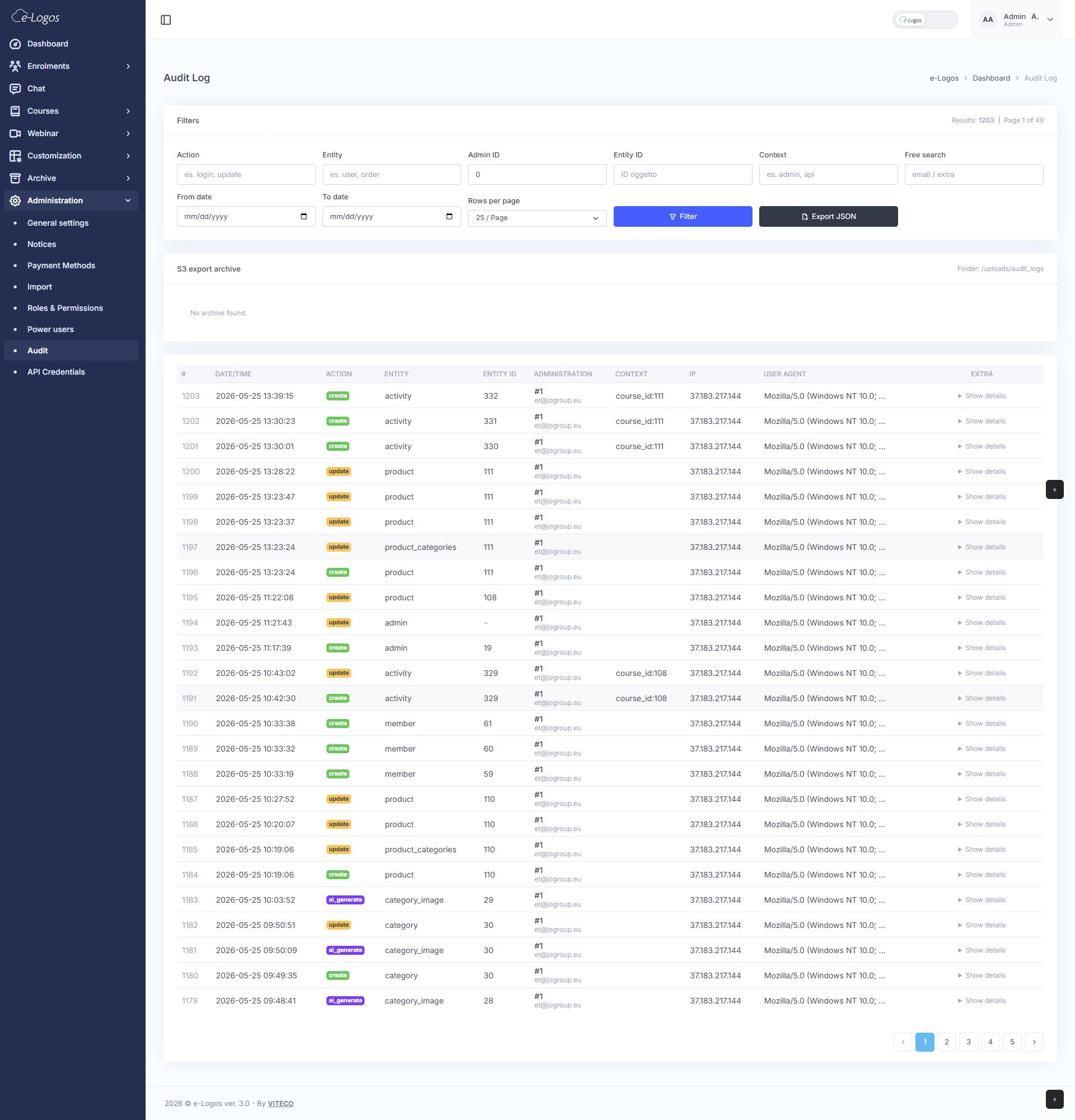
Example
Want to understand who edited a course?
- Go to the Audit section;
- In the Entity filter, enter “course” or “product”, if used internally;
- If you know the course, enter its Entity ID;
- Set a date range to narrow the search.
- Click Filter.
At this point, users will see all operations related to that course, such as:
- who edited it;
- when the edit was made;
- what type of action was performed.