


How to manage your subscription plan
You can manage your subscription plan yourself directly from the e-Logos platform by accessing the Stripe portal.
Accessing plan management
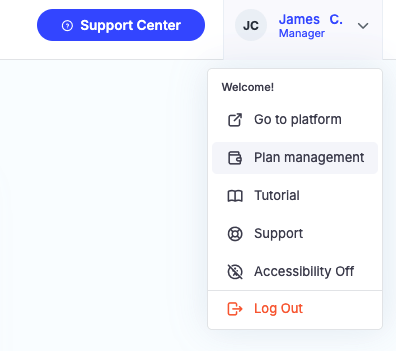
- In the top right corner, click on the icon with your first and last name (profile picture);
- From the dropdown menu, select Plan Management;
- A Stripe window will open: enter the email address associated with your subscription;
- Open the email you received and click the link to access the portal.
What you can do on Stripe
Once logged in, you can:
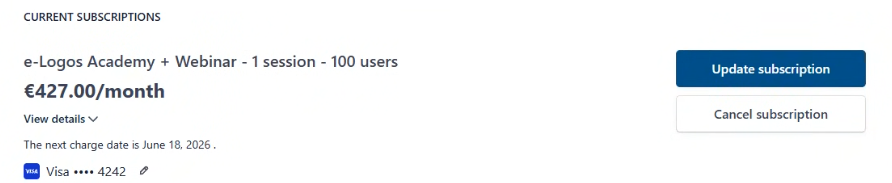
- View your active plan and renewal date;
- Update or cancel your subscription;
- Manage payment methods;
- Edit billing information;
- Download previously issued invoices.
How to upgrade your subscription
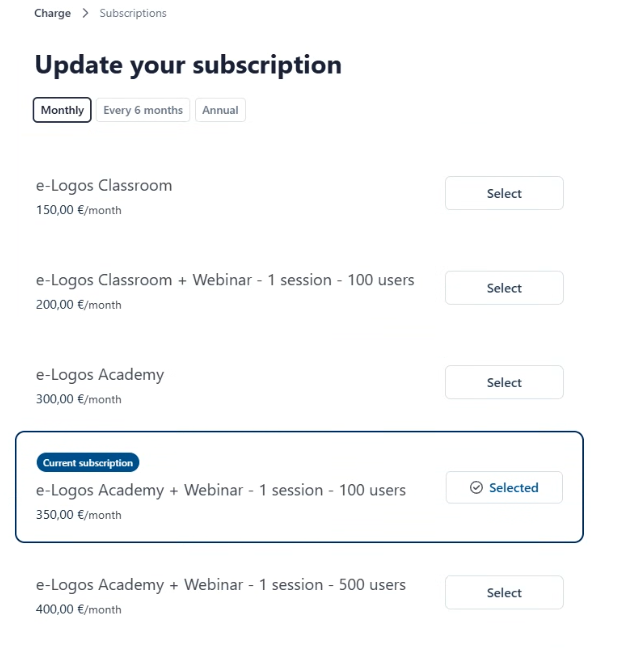
- Click on Upgrade Subscription;
- Choose the frequency: Monthly, Semi-annual, Annual;
- Select the plan you prefer;
- Complete the payment using your preferred method.
If you upgrade to a higher-priced plan during your subscription period, you will only pay the price difference between the two plans.
How to cancel your subscription
- Click on Cancel Subscription;
- Confirm the cancellation.
Your subscription will remain active until the expiration date indicated on the portal. No further charges will be incurred.
What happens if I don't renew my subscription?
The platform will remain accessible for 7 days after the expiration date. After 7 days, access will be suspended. You can reactivate your account for free, with all your data intact, within 1 month of suspension.
All data will be retained for a period of 10 years and can be retrieved upon request for a fee.